
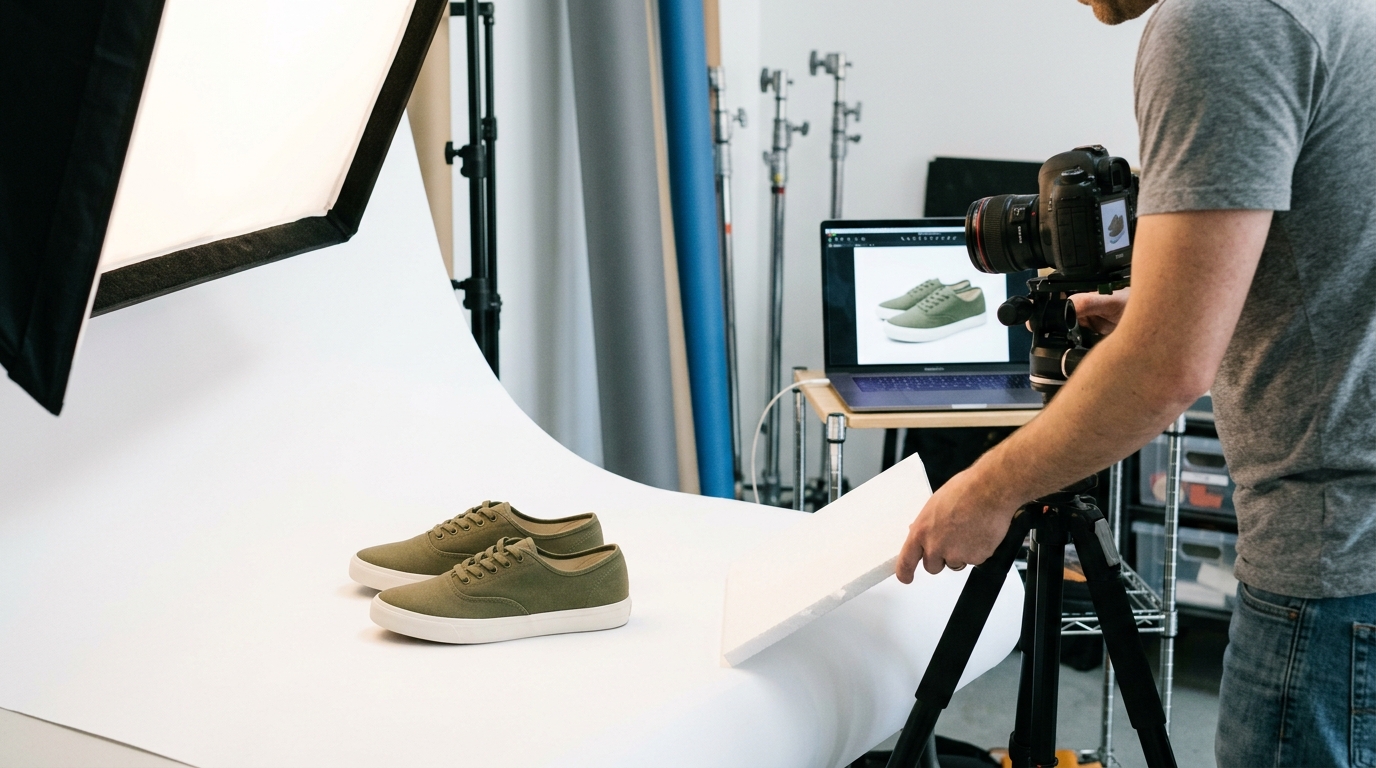
Great ecommerce product photography directly impacts conversion rates. Sharp lighting, clean backgrounds, multiple angles, and consistent editing can transform how shoppers perceive your products—and how often they buy them. This guide covers everything from basic setup to advanced techniques for capturing images that sell.
Every online shopper has experienced it: you find a product that sounds perfect, but the photos are blurry, poorly lit, or shot from only one angle. So you leave. No purchase. No second thought.
That split-second judgment is the reality of selling online. Shoppers can’t touch, smell, or test your products before buying—your images are doing all the heavy lifting. Research consistently shows that product visuals are one of the top factors influencing purchasing decisions in online retail. Poor photography doesn’t just look unprofessional; it directly costs you sales.
The good news? You don’t need a Hollywood studio budget to shoot compelling ecommerce product images. With the right techniques, tools, and a bit of practice, any seller—from solo entrepreneurs to growing brands—can produce photos that build trust, reduce returns, and drive revenue.
This guide walks you through everything: gear selection, lighting setups, shooting techniques, editing workflows, and platform-specific best practices. Whether you’re launching your first product or refreshing an existing store, these strategies will help you shoot smarter and sell more.
Why Product Photography Directly Affects Ecommerce Conversions

Before diving into technique, it’s worth understanding the stakes. Ecommerce product photography isn’t just a visual nicety—it’s a commercial tool with measurable impact.
According to a study by Shopify, stores that display high-quality product images experience significantly higher conversion rates than those with low-resolution or minimal visuals. Another report found that 75% of online shoppers rely on product photos when deciding whether to make a purchase. That figure alone justifies the investment.
Beyond conversions, strong visuals reduce return rates. When customers receive exactly what they expected based on the photos, they’re less likely to send it back. Returns are expensive—photography that sets accurate expectations is a form of cost control.
There’s also the brand credibility factor. Polished, consistent product images signal professionalism. They tell shoppers: this business takes quality seriously. That trust is hard to quantify but easy to lose with a single blurry photo.
What Equipment Do You Actually Need for Ecommerce Product Photography?
The good news upfront: you don’t need a $5,000 camera to get started. A modern smartphone with a 12MP+ camera can produce excellent results when used correctly. That said, here’s a breakdown of what matters most.
Camera Options: Smartphone vs. DSLR
|
Equipment |
Best For |
Pros |
Cons |
|---|---|---|---|
|
Smartphone (iPhone 14+, Samsung S23+) |
Small businesses, quick shoots |
Affordable, portable, good auto-settings |
Limited manual control, smaller sensor |
|
Entry-level DSLR (Canon Rebel, Nikon D3500) |
Growing brands |
Better image quality, interchangeable lenses |
Steeper learning curve, higher cost |
|
Mirrorless Camera (Sony a7 series) |
Professional sellers |
Excellent quality, compact body |
Expensive |
For most ecommerce sellers just starting out, a recent smartphone paired with a tripod will get the job done. As your volume and budget grow, upgrading to a DSLR or mirrorless camera gives you more control and flexibility.
Essential Gear for a Basic Product Photography Setup
- Tripod: Eliminates camera shake and ensures consistency across shots
- White sweep or backdrop: Creates a clean, distraction-free background
- Softbox or ring light: Controls light direction and intensity
- Reflector card: Bounces light to fill in shadows
- Shooting table: Elevates small products and creates a seamless background curve
A basic product photography setup can cost as little as $100–$200 if you shop smart. That’s a modest investment compared to the sales impact professional-looking images can generate.
How to Light Your Products for Maximum Visual Impact
Lighting is arguably the single most important variable in product photography for ecommerce. It defines texture, shape, color accuracy, and mood. Get the lighting wrong, and even an expensive camera won’t save you.
Natural Light vs. Artificial Light: Which Should You Use?
Natural light—specifically diffused sunlight through a window—is free, flattering, and surprisingly effective for smaller products like jewelry, cosmetics, and food. The key is consistency. Natural light changes throughout the day, so if you’re shooting a large batch of products, you risk color and exposure inconsistencies.
Artificial lighting, particularly softboxes or LED panels, gives you full control. You can shoot at any time of day, replicate the same setup repeatedly, and adjust intensity precisely. For any seller producing regular content at volume, artificial lighting is the more reliable choice.
Setting Up a Two-Light or Three-Light System
For most online store product photography, a simple two-light setup works well:
- Key light: Your primary light source, positioned at 45 degrees to one side of the product
- Fill light: A secondary light (or reflector) on the opposite side, softening shadows created by the key light
Add a third backlight if you want to separate the product from the background or create a subtle rim effect. This is particularly effective for dark products on white backgrounds.
Avoiding Common Lighting Mistakes
- Harsh shadows: Use diffusion material (like a white sheet or softbox cover) over bright lights
- Overexposure: Pull lights back or reduce power to preserve detail in highlights
- Mixed color temperatures: Never mix warm bulbs with cool daylight—your whites will look off
Choosing the Right Background for Your Product Images
The background in your ecommerce product images sets the visual stage. It either draws attention to your product or competes with it.
White Backgrounds: The Ecommerce Standard
Most major platforms—Amazon, Google Shopping, Walmart Marketplace—require or strongly recommend white backgrounds for primary product images. White backgrounds create visual consistency, load faster, and make it easier for customers to focus on the product itself.
You can achieve a white background with:
- A white foam board or poster board
- A professional sweep paper roll
- A lightbox (ideal for small products)
- In post-processing, using background removal tools like Remove.bg or Adobe Photoshop
Lifestyle and Contextual Backgrounds
While white backgrounds are the standard for primary images, lifestyle shots on contextual backgrounds are powerful for secondary images. Showing a coffee mug on a kitchen counter, or a pair of sneakers on a trail, helps customers visualize the product in their own life.
Lifestyle imagery performs especially well on platforms like Instagram, Pinterest, and Shopify homepages—anywhere that storytelling matters as much as clarity.
Colored and Gradient Backgrounds
Colored backgrounds can strengthen brand identity when used consistently. If your brand palette includes navy blue, deep green, or warm terracotta, using those tones as backgrounds creates a cohesive look across your product catalog.
The key rule: the background should never compete with the product. Low-contrast, muted tones typically work better than bright, saturated colors.
Product Photography Techniques That Improve Image Quality
Equipment and lighting create the foundation. Technique is what separates average photos from images that convert.
Shoot in RAW Format
If your camera supports it, always shoot in RAW rather than JPEG. RAW files capture significantly more data, giving you far more flexibility during editing. You can recover blown-out highlights, adjust white balance after the fact, and fine-tune exposure without degrading image quality.
For smartphone shooters, many recent models offer a “ProRAW” or “RAW” mode through the native camera app or a third-party app like Lightroom Mobile.
Use Manual Focus for Sharp Detail
Autofocus is convenient, but for detailed products—electronics, jewelry, textiles—manual focus gives you precise control over which part of the image is sharpest. Lock focus on the most important feature of your product: the logo on a bag, the face of a watch, the texture of a fabric.
Shoot Multiple Angles for Every Product
A single front-facing shot leaves too many questions unanswered. Comprehensive online store product photography typically includes:
- Front view: The primary, hero image
- Back view: Shows details shoppers can’t see from the front
- Side profile: Communicates depth and dimensions
- Top-down (flat lay): Effective for accessories, apparel, and packaged goods
- Detail/macro shots: Highlights texture, stitching, materials, or serial numbers
- Scale reference shot: Shows the product next to a common object or being held/used
Amazon recommends a minimum of six images per listing. Shopify data shows that listings with multiple images convert better than single-image listings—more angles means fewer unanswered questions, which means fewer hesitations at checkout.
Maintain Consistency Across Your Catalogue
Consistency builds professionalism. When every product image shares the same background, lighting style, and angle set, your store looks cohesive and trustworthy. To maintain that consistency:
- Use the same camera settings for every session
- Set up a permanent or semi-permanent shooting station
- Create a style guide with reference images for each product category
- Batch similar products together in a single shoot
How to Edit Ecommerce Product Photos Professionally
Shooting great photos is step one. Editing them is where the final polish happens. Even well-shot images typically need some level of post-processing before they’re ready for a product listing.
Essential Editing Adjustments
|
Adjustment |
Purpose |
|---|---|
|
White balance correction |
Ensures accurate, true-to-life colours |
|
Exposure adjustment |
Brightens or darkens the overall image |
|
Contrast enhancement |
Adds visual depth and definition |
|
Sharpening |
Brings out fine details and texture |
|
Background cleanup |
Removes dust, stray fibres, or shadows |
|
Cropping & alignment |
Ensures consistent framing across all images |
Recommended Editing Tools
Adobe Lightroom is the industry standard for batch editing product photos. Its presets and sync features let you apply the same adjustments across hundreds of images simultaneously—a major time-saver for large catalogues.
Adobe Photoshop handles more advanced retouching: removing blemishes from products, cleaning up backgrounds, or compositing multiple exposures.
Canva and Pixlr are accessible, browser-based alternatives for sellers who want basic editing without the cost of an Adobe subscription.
Remove.bg uses AI to automatically cut out product backgrounds in seconds—useful for creating consistent white or transparent backgrounds at scale.
How Much Editing Is Too Much?
Edit to enhance, not to deceive. Over-saturating colors, removing legitimate product characteristics, or altering proportions creates a mismatch between the photo and the actual product—which leads to returns and negative reviews. Accurate representation builds long-term trust.
Platform-Specific Guidelines for Ecommerce Product Images
Different ecommerce platforms have specific technical requirements and best practices. Ignoring these can mean your images get rejected, downgraded in search results, or displayed poorly.
Amazon Product Image Requirements
- Primary image: Pure white background (RGB 255, 255, 255)
- Minimum 1,000 pixels on the longest side (for zoom functionality)
- Product fills at least 85% of the image frame
- No watermarks, logos, or text overlays on the primary image
- JPEG preferred format
Shopify Image Best Practices
- Recommended size: 2048 x 2048 pixels for high-resolution zoom
- Consistent square or portrait aspect ratio across all product images
- Alt text for every image (improves SEO and accessibility)
- Compressed file size to maintain fast page loading (use tools like TinyPNG or Shopify’s built-in compression)
Instagram and Social Commerce
- Square (1:1) or portrait (4:5) ratios perform best in feed
- Lifestyle images outperform plain white background shots for engagement
- Consistent color palette and aesthetic across your grid strengthens brand recognition
Advanced Ecommerce Photography Techniques Worth Considering

Once you’ve mastered the basics, these advanced approaches can differentiate your store from competitors.
360-Degree Product Photography
Spinning product photography—where users can rotate the product view interactively on a product page—has been shown to increase conversion rates significantly for categories like footwear, furniture, and electronics. Tools like Sirv and Magic360 make this achievable without a massive budget.
Ghost Mannequin Photography for Apparel
For clothing sellers, the ghost mannequin (or “invisible mannequin”) technique creates the illusion of a product being worn without showing a model. The garment is shot on a mannequin, then the mannequin is removed in post-processing, leaving a clean, three-dimensional shape. This is far more cost-effective than hiring models for every product.
Macro Photography for Small Products
Jewelry, electronics components, cosmetics, and food products often benefit from extreme close-up shots that reveal texture and craftsmanship. A macro lens (or the macro mode on a smartphone) lets you get within centimeters of a product and still achieve sharp focus.
Video and Motion Content
Short looping product videos—even just 5–10 seconds—are increasingly common on product pages and perform strongly in social ads. They capture attention faster than static images and convey how a product moves, functions, or fits in ways that still photography can’t.
Common Ecommerce Product Photography Mistakes to Avoid
Knowing what not to do is just as valuable as knowing best practices.
- Cluttered backgrounds: Anything in the frame that isn’t the product competes for attention
- Inconsistent lighting between images: Creates an unprofessional, disjointed catalog appearance
- Low resolution: Images that look fine on a laptop become pixelated on a 4K display or when zoomed
- Too few images per listing: Leaves customers with unanswered questions
- Ignoring mobile viewers: Check how your images appear on a phone screen—many shoppers browse exclusively on mobile
- Skipping alt text: Missing alt text hurts both SEO and accessibility
Building a Scalable Product Photography Workflow
As your product catalog grows, ad hoc photography sessions become unsustainable. A repeatable, scalable workflow is the answer.
Steps for an Efficient Shoot-to-Publish Pipeline
- Pre-shoot prep: Clean and stage all products before setup. Create shot lists with required angles for each item.
- Batch by product type: Shoot all products with similar dimensions and backgrounds in one session.
- Tether your camera: Connect your camera to a laptop with software like Adobe Lightroom or CaptureOne to review images in real time on a larger screen.
- Edit in batches: Use Lightroom’s sync feature to apply the same base adjustments across all images from the same shoot.
- Create a naming convention: Consistent file naming (e.g., ProductName_Angle_Version) keeps your library organized as it scales.
- Quality check before upload: Review each image at 100% zoom to catch focus issues, dust spots, or background inconsistencies before they reach your live store.
Frequently Asked Questions About Ecommerce Product Photography
How much does professional ecommerce product photography cost?
Professional product photography ranges from $25 to $75+ per image depending on complexity, product size, and the photographer’s experience level. Full-service studios that handle setup, shooting, and editing charge more but deliver consistent results at scale. DIY setups can produce comparable results for a fraction of the cost once you’ve mastered the basics.
What is the best camera for ecommerce product photography beginners?
For beginners, a recent iPhone or Samsung Galaxy flagship with a tripod and good natural lighting is a practical starting point. The camera quality in these devices is exceptional. If you’re ready to invest in dedicated gear, an entry-level DSLR like the Canon EOS Rebel SL3 or Nikon D3500 paired with a 50mm prime lens is a strong choice.
How many product images do I need per listing?
Amazon recommends at least six images per listing. Shopify recommends a minimum of three to five. In practice, more images tend to perform better—especially for products where size, texture, or function needs to be communicated clearly. Aim for at least one hero shot, one detail shot, one lifestyle shot, and one packaging or scale reference shot per product.
What background color is best for product photos?
White is the most versatile and widely required background color for ecommerce, particularly for marketplace listings on Amazon and Google Shopping. For brand-forward lifestyle imagery on your own website or social media, contextual or brand-colored backgrounds can strengthen visual identity and emotional appeal.
How do I make my product photos stand out from competitors?
Focus on lighting consistency, accurate color representation, and lifestyle context. Invest in macro shots that reveal craftsmanship or texture. Use 360-degree photography or short video loops for high-consideration products. Most importantly, maintain visual consistency across your entire catalog—a cohesive store looks trustworthy, and trust is what converts browsers into buyers.
Do I need a professional photographer, or can I do it myself?
Many successful ecommerce sellers shoot their own product photos, particularly in early growth stages. With the right setup—a clean background, controlled lighting, a tripod, and post-processing—high-quality DIY results are entirely achievable. As your brand scales and visual content demands increase, bringing in a professional photographer or studio periodically becomes a worthwhile investment.
Start Shooting Smarter: Your Next Steps
Strong ecommerce product photography isn’t about having the most expensive gear—it’s about understanding light, angles, consistency, and how customers make decisions when they can’t touch what they’re buying.
Start simple: set up a clean white background, get your lighting consistent, shoot multiple angles, and edit for accuracy rather than perfection. Build from there. As your product catalog grows and your visual confidence increases, layer in more advanced techniques like 360-degree photography, ghost mannequin shooting, or short video content.
The sellers who win in ecommerce aren’t always the ones with the best products. They’re the ones who present their products in a way that makes the buying decision feel obvious. That starts with the images.